Two days ago I wrote about Complianz, the plugin I have used to implement a cookie banner. In this blog post, I’ve mentioned that I have removed any cookies from this blog and that I am using a two-click solution for any embed. This is where the Embed Privacy plugin comes into play.
What does Embed Privacy do?
If you want to embed some external resource in WordPress, you often simply paste the URL to this resource, like a YouTube video, into the editor, and WordPress will automatically embed it using the oEmbed format. This is really handy, but it also means that as soon as someone visits this page, the external resource will be loaded, and personal data might flow to this external service. To comply with the GDPR, CCPA, and similar regulations, this is often not allowed. You need consent from the person to show the embedded resource and (potentially) send data to this external service. You may get this consent through a category of your cookie banner, or you let them approve the embed. This is what Embed Privacy allows you to do. It automatically replaces many embeds on your site with a “two-click solution”, meaning that the first time someone sees an external embed, they are asked if they want to view it. Here is an example of a YouTube embed from a recent blog post:
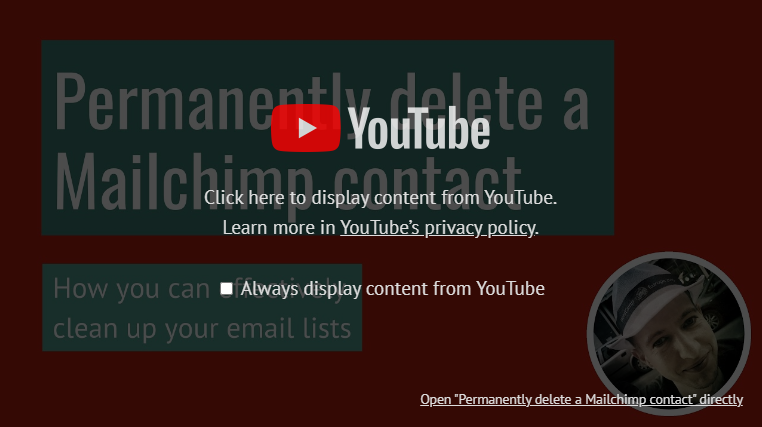
To display the video, you can either click on that “overlay”, or you can choose to always display YouTube embeds on the page. There are also links to open the privacy policy of the embedding service and a link to open the external resource. Embed Privacy also offers an option to download the “placeholder” image from the external service, if this is available. Those placeholder images are stored/cached into the folder wp-content/uploads/embed-privacy/thumbnails/ on your server, so those as well do not load anything from the external server by the person visiting your page, making it a privacy-friendly option.
Why do I use Embed Privacy?
As mentioned earlier, I do not like to have a cookie banner on websites, if there are other alternatives. And in my opinion, Embed Privacy is the perfect plugin to implement two-click solutions for many embeds. If you need to embed a service that it does not handle already, you can add your own services. I’ll probably write a blog post on how to do that in January.
Another reason I like this plugin is that fact that it is developed and maintained by the German developer Matthias Kittsteiner under the Epiphyt brand. I may, or may not, write about another of his plugins. Maybe as soon as tomorrow. 😉
Conclusion
If you are like me, and you want to use a two-click solution for embeds, why not give Embed Privacy a try? Are you already using it or do you use a similar solution, then please share your thoughts in a comment.